Quick Answer
Microsoft Word and LibreOffice Writer both open .odt documents directly on Windows. Convert via Save As (.docx) or Export (.pdf); use Karuzip only when you want to extract original images from Pictures/ or inspect content.xml offline.
Windows 11 / 10 (64-bit) · Free · Zero ads
Choose the right workflow first
View, edit, or convert to Word DOCX
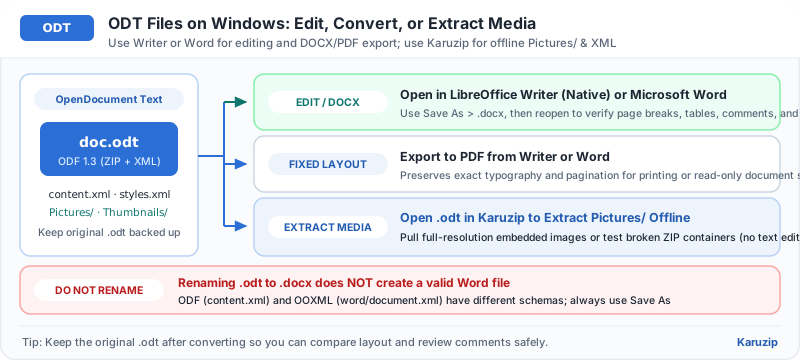
Open the .odt in LibreOffice Writer (native) or Microsoft Word, then Save As DOCX or Export PDF.
Pull original images or inspect broken ODT
Open the .odt in Karuzip to extract the Pictures/ folder or inspect content.xml offline.
Open or convert an ODT file in 4 steps
Both Word and LibreOffice Writer handle ODT natively without needing online converters.
- Keep the original ODT file backed upKeep an untouched copy of the .odt before saving in another format.
- Open the ODT in LibreOffice Writer or WordOpen the document and review page breaks, tables, and headers.
- Use Save As for DOCX or Export for PDFChoose Save As > Word Document (.docx) for editing in Word, or Export as PDF to preserve exact layout.
- Use Karuzip to extract original images if neededOpen the .odt in Karuzip to browse Pictures/ and extract embedded graphics without re-compression.
ODT tools on Windows compared
| Tool | Read & edit document | Convert to DOCX / PDF | Extract raw Pictures/ |
|---|---|---|---|
| LibreOffice Writer | Native ODT fidelity | Yes | Via export |
| Microsoft Word | Supported directly | Yes | No |
| Karuzip | No (archive tool) | No | Yes, direct original images |
Common ODT conversion pitfalls
Avoid renaming extensions and check tables after converting.
- Renaming .odt to .docx fails: ODT and DOCX use completely different XML structures inside their ZIP wrappers. Always use Save As.
- Formatting shifts in Word: If complex tables or styles shift in Word, open the .odt in LibreOffice Writer and export a PDF for exact printing.
- Corrupted ODT file: Run an archive test in Karuzip to check whether the ZIP layer is intact and salvage content.xml or Pictures/.
ODT on Windows checklist
Frequently asked questions
Can Microsoft Word open ODT files on Windows?
- Answer
Yes. Microsoft Word opens .odt files directly, and LibreOffice Writer is a free native OpenDocument alternative.
How do I convert ODT to DOCX?
- Answer
Open the .odt in Word or LibreOffice Writer and use Save As > Word Document (.docx). Do not rename the file extension.
Can Karuzip extract images from an ODT file?
- Answer
Yes. Because ODT is a ZIP container, Karuzip opens it directly and lets you extract original images from the Pictures/ folder.
Does Karuzip let me read or edit ODT documents?
- Answer
No. Karuzip is for inspecting and extracting the archive container. Use LibreOffice Writer or Word to read and edit documents.
Verification & product scope
- Current release
- Karuzip v3.0.0 (14.71 MB installer, Windows 11 / 10 64-bit)
- Format coverage
- 320 extractable formats · 230 automated-verified · 12 real-machine verified
- RAR & password policy
- RAR is extract-only (no RAR creation). Karuzip never cracks, guesses, or recovers passwords.
- Checked date
- 2026-08-01
Archive integrity tests verify readability only and are not malware scans. Scan extracted executables or scripts with Windows Security before running them.
Official references

Inspect ODT packages and extract images with Karuzip
Browse OpenDocument ZIP containers offline on Windows 11 and 10.
- v3.0.0 · updated 2026-11-16
- No ads or bundled software
- App sends no usage data
Karuzip runs on Windows 10 / 11. Open this page on a Windows PC to download it.