On this page (3 chapters)
Preview the archive first
Viewing the list helps you identify the right archive before extracting its files.
Open the list
Use View contents to show the archive list without extracting its files to your destination. This makes it easier to inspect the names, folders, and file sizes first.
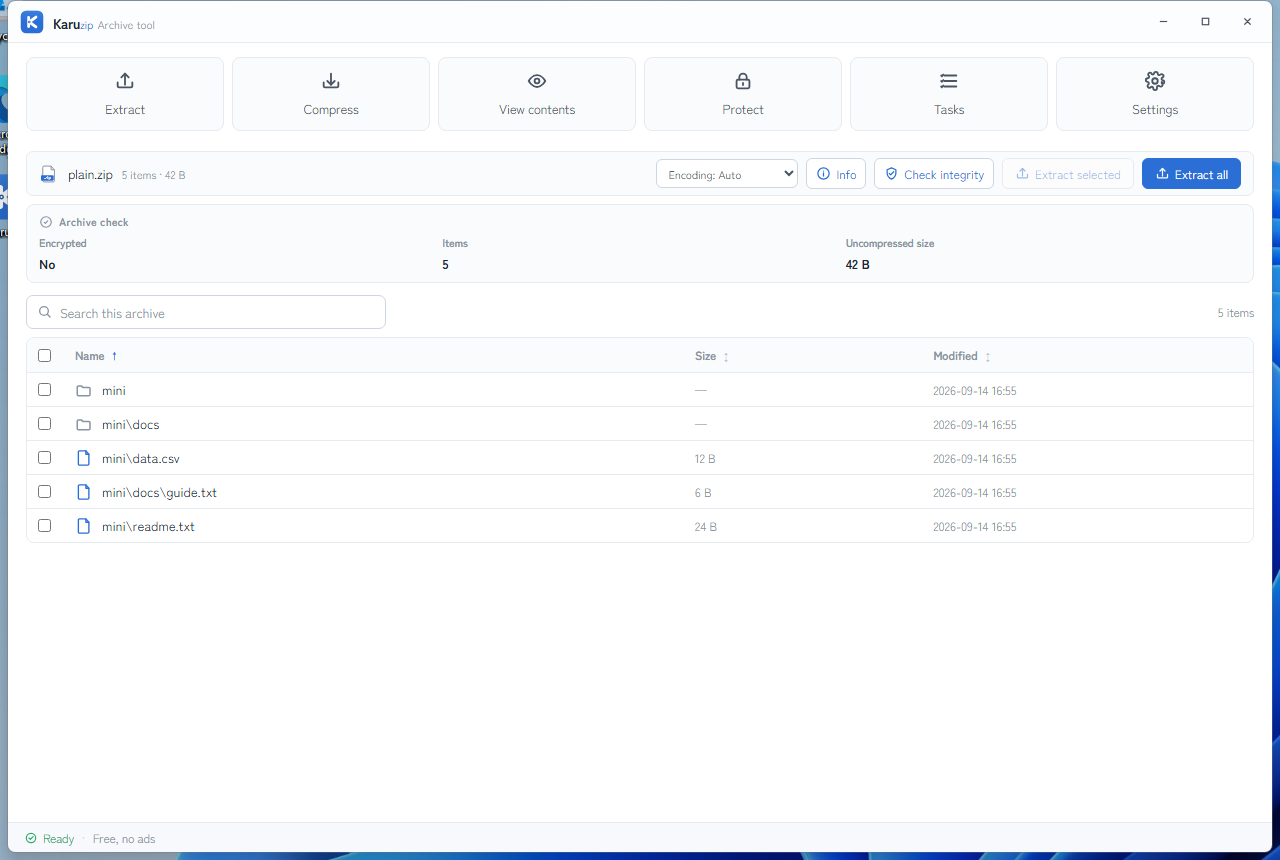
Search and sort
Find the item you want by searching the list and then sorting by name, size, or modified time. That is faster than extracting blindly.
Viewing the list does not extract archive contents
Viewing contents opens the archive list. Archive contents are not extracted until you choose to extract, and you can pick only the entries you need. Karuzip may still save local history and processing records; this is not a guarantee of zero disk writes.
For older ZIP archives, switch Filename encoding before extraction. Changing the filename encoding affects names only. It does not rewrite the archive or repair damaged data. The dedicated guide is Fix garbled ZIP filenames.
Separate preview from archive damage
A readable list and a healthy archive are two different things. Keep them separate with three steps.
- Preview the archive list. Seeing the list helps you decide whether the file is the archive you expected, but it is not a guarantee that extraction will succeed.
- Check the archive when needed. If the archive looks suspicious, run a check so you can separate a readable list from a file that is actually damaged.
- Extract only the selected files. Once you know what you need, choose only those items instead of unpacking the whole archive.
Frequently asked questions
Does viewing contents extract files?
No. Viewing contents opens the archive list so you can inspect it first. You choose what to extract only after you decide the archive is the right one.
Can I search and sort the archive list?
Yes. Karuzip lets you search and sort archive contents before extraction so you can find the files you need more quickly.
Does the list prove the archive is healthy?
No. A visible file list is useful, but it does not prove that extraction will succeed. Run a check if you need to separate preview from actual archive damage.
Can I extract only selected files after previewing?
Yes. Previewing the list first lets you choose only the files you need instead of extracting the whole archive.
What if the filenames look garbled?
For older ZIP archives, switch Filename encoding before extraction. Changing the filename encoding affects names only. It does not rewrite the archive or repair damaged data.
Official references
- 7-Zip: How to recover corrupted 7z archive — official notes about opening an archive and seeing the list before extraction (accessed August 13, 2026).
- 7-Zip FAQ — official notes about extract commands and archive behavior (accessed August 13, 2026).
- Microsoft Support: Zip and unzip files — the Windows 11 archive baseline (accessed August 13, 2026).
Inspect the list before extracting files
Karuzip lets you preview an archive first so you can pick the right files. No ads, no bundles, and no app telemetry.

Know what “view contents” actually means
Karuzip lists archive entries and metadata without extracting the whole archive first. The 2.2.3 development build adds clearer folder navigation, including Up, Back, and Forward, while retaining search, sorting, and selected extraction.
A list of image, PDF, or text filenames is not an embedded preview of the files themselves. To read one document, select that entry and extract it to a deliberate location. Keep executable files unopened unless you trust the source and have checked them separately.
For an agent, use archive.list --max-entries 20 to bound the first inspection. Read truncated and total_count in the output so a partial list is not described as the full archive. Copy the exact entry name from the list when requesting selected extraction.
Command example
karuzip-cli --json archive.list --archive ".\sample.zip" --max-entries 20
karuzip-cli --json archive.extract_selected --archive ".\sample.zip" --destination ".\one-entry-out" --entry "docs/readme.txt" --conflict-policy skip
Replace the sample paths with your own test inputs. Keep global options before the action. Check the exit code and final JSON; these snippets are command examples, not proof that your archive will succeed.
Start with the CLI reference, then follow the actual local-command workflow for Codex, Claude Code, or DeepSeek Harness.
Content checked against the 2.2.3 development source on September 12, 2026. Public download: 2.2.5. Historical screenshots and measurements retain their original version. Editorial and testing policy.