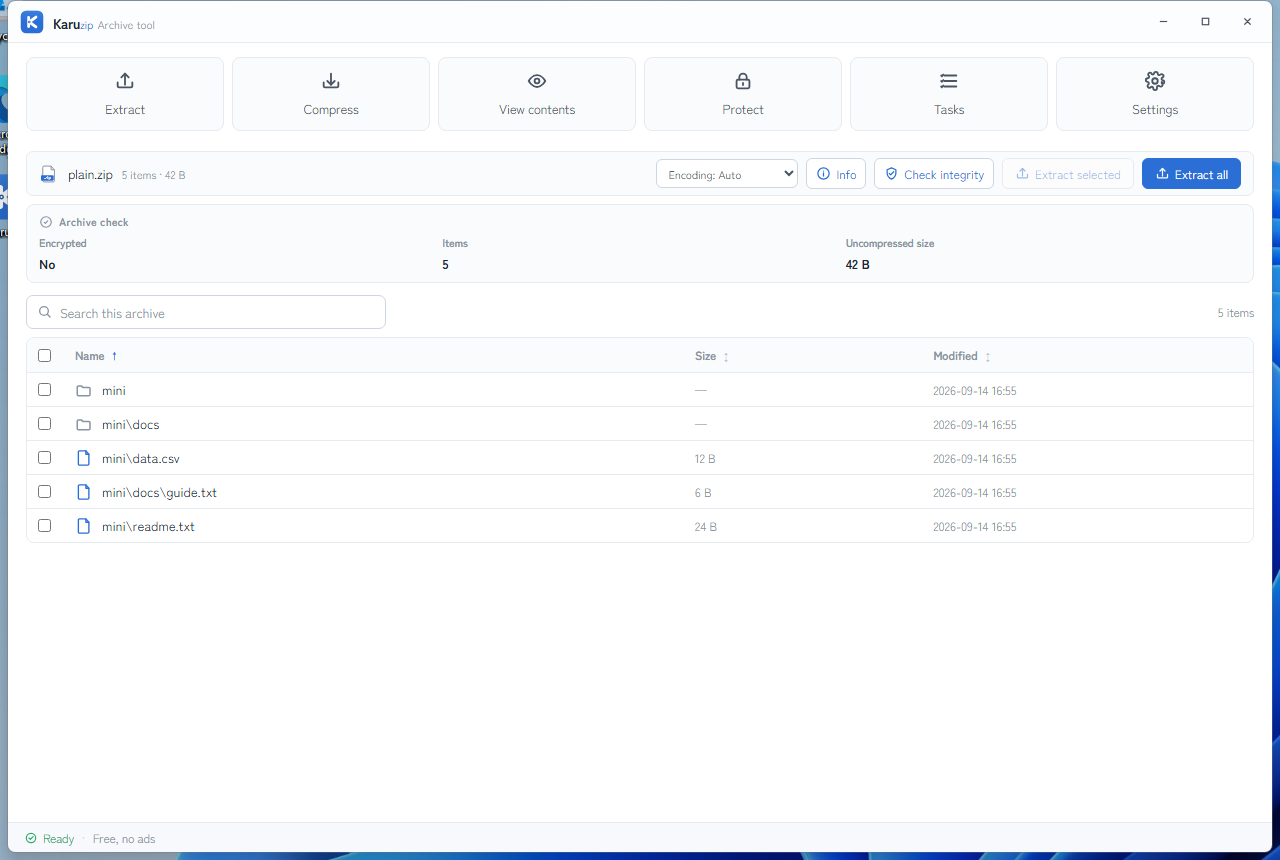
Open the ZIP in Karuzip, check the entry names and size, then extract to a folder you have chosen. For a repeatable task, use karuzip-cli to inspect, test and extract it. A successful archive test checks archive integrity; it does not certify that the files are safe or valid documents.
Reviewed 12 September 2026 by the Karuzip team. This guide checks the 2.2.3 development candidate; the public website download is still 2.2.5. How we verify and correct content.
What a ZIP file is
A ZIP stores each entry with its own metadata and compression method. Some entries are compressed, while others are stored without compression. That is why ZIP can package photos or videos without making them much smaller, and why a reader can extract one selected entry.
| Main extension | .zip. The related .zipx name may use additional compression methods; check the actual archive. |
|---|---|
| Karuzip reads | Ordinary ZIP, supported encrypted ZIP variants, and supported split archives. The compression method and input condition still matter. |
| Karuzip creates | ZIP, including optional ZipCrypto password protection. Creating AES-256-encrypted ZIP is not a Karuzip option; use 7z for Karuzip's AES-256 creation path. |
| Windows Explorer | Useful for ordinary unencrypted ZIP files. Encrypted archive support differs from opening a plain ZIP. |
| Large archives | ZIP64 extends older size and entry-count fields. Available disk space, filesystem limits and the receiving application still constrain practical use. |
Inspect and extract a ZIP in the desktop app
- 1
Save the complete archive
Wait for the download to finish. Keep the original ZIP and check its source. A renamed extension does not convert the file.
- 2
Open it and review the list
Drag the ZIP into Karuzip or open it from the app. Check names, directories and expanded sizes. If older filenames look wrong, select the matching filename encoding before extraction.
- 3
Choose entries and a destination
Extract the full archive or only the entries you need. Start with a new output folder so the result is easy to check. Review any skipped or conflicting files.
- 4
Check the actual output
Compare the files you expected with those extracted. Open documents or images in their own applications. Keep the original until you have checked the result.
Inspect, test and extract from the CLI
The CLI is included with the official website edition; Microsoft Store does not include it. Open a new terminal after installation and start with karuzip-cli --json actions. Replace these example paths with your own files. Create the destination parent folder first; extraction can create the final new child folder.
karuzip-cli --json archive.inspect --archive ".\sample.zip"
karuzip-cli --json archive.list --archive ".\sample.zip" --max-entries 20
karuzip-cli --json archive.test --archive ".\sample.zip"
Read the results before extracting. Exit code 0 means success, 1 means failure, and 2 means cancellation. A list capped at 20 entries is not a full inventory of a larger archive.
karuzip-cli --json archive.extract --archive ".\sample.zip" --destination ".\output-zip" --conflict-policy skipUse archive.extract_selected with repeated --entry arguments when you only need particular entries. Take entry names from the actual list. For encrypted inputs, --password-stdin is a global option before the action; provide the password through standard input rather than a command argument or an agent prompt.
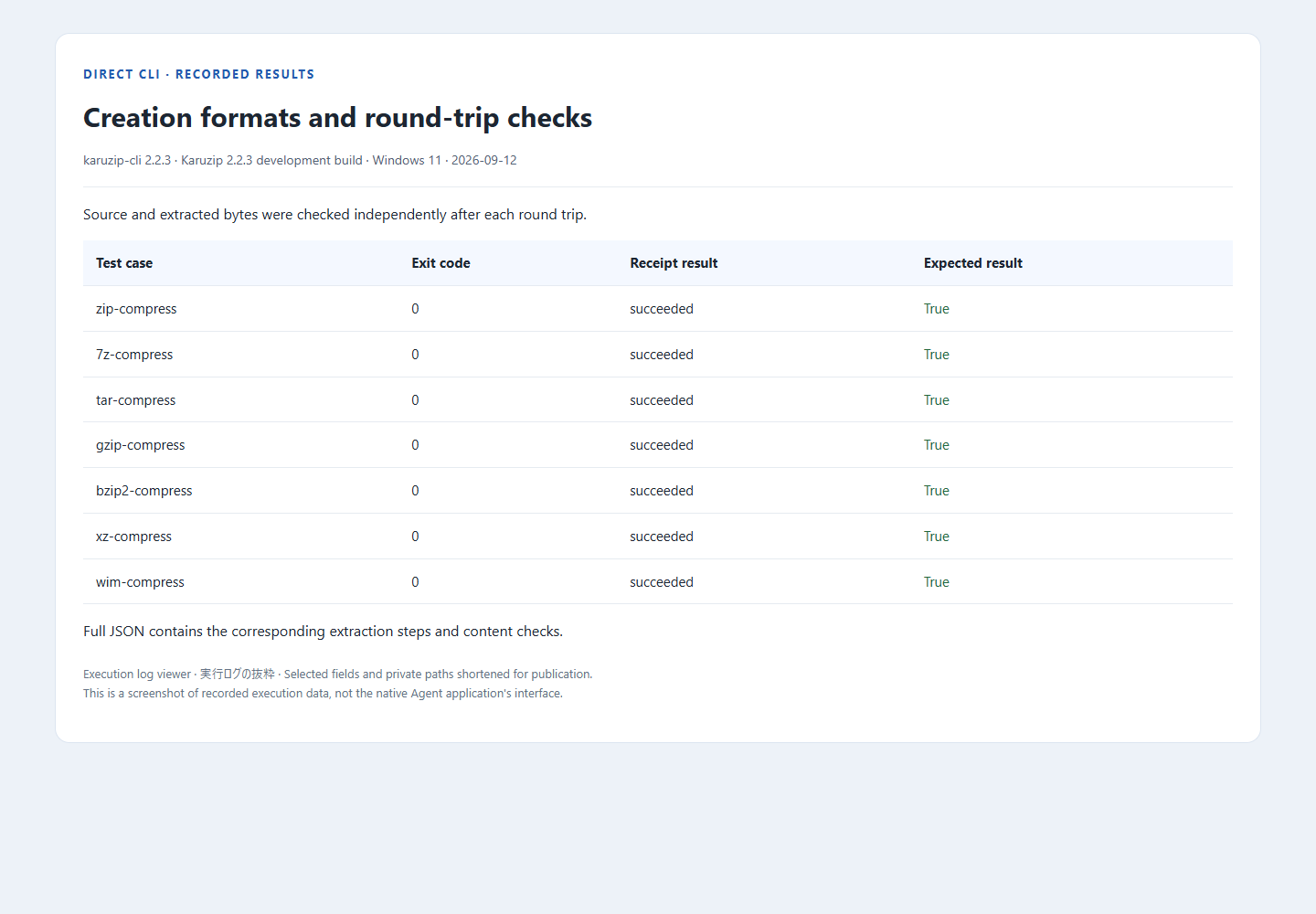
Full CLI syntax, examples and limits · 2.2.3 candidate test inputs and execution results. The log covers its listed samples; it is not a claim that every ZIP method or every supported format was retested.
Create and verify a ZIP for delivery
Select a file or folder in the app and choose ZIP, or run the equivalent CLI action. Choose a new output name and verify the resulting archive before sharing it.
karuzip-cli --json archive.compress --input ".\delivery" --output ".\delivery.zip" --format zip
karuzip-cli --json archive.test --archive ".\delivery.zip"
Check the archive's entry list as well as its integrity. A valid ZIP can still contain the wrong version of a file. See the password-protected ZIP guide for recipient compatibility and the distinction between ZIP ZipCrypto and 7z AES-256.
Use an agent for the repeatable steps
When its environment permits local command execution, an agent can discover the CLI actions, inspect the input, run the integrity test and extract to a named output folder. Ask it to stop on failure and report the actual receipt and files produced.
Codex: inspect and extract a ZIP, Claude Code: package and verify deliverables, and DeepSeek harness: prepare the environment and call the CLI record the separate environments and results. Calling a local executable does not imply a built-in MCP integration or an entirely offline agent session.
Choose the next step from the symptom
| What you see | What to check |
|---|---|
| Unsupported or incomplete archive | Confirm the download and actual format. Keep the original and read the ZIP troubleshooting guide. |
| Password required or rejected | Get the correct password from the owner and check the encryption method. Karuzip does not recover unknown passwords. |
| Garbled filenames | Review the original encoding and compare names before extraction. See the filename encoding examples. |
| Several numbered volumes | Keep the complete set together. Use the first volume for inspect, list and test. The 2.2.3 candidate's non-first-volume extraction fix does not make every CLI action resolve the first volume. |
| Successful test, unusable document | Archive integrity and document validity are different. Check the document in its own application or recover a known good version. |
| Not enough space or missing output | Check expanded size, destination permissions and skipped conflicts. Do not repeatedly rerun over an existing directory without reviewing the result. |
Sources and verification scope
- PKWARE ZIP Application Note: container structure, methods and ZIP64 fields.
- Microsoft: Zip and unzip files: Windows archive operations and encrypted-archive limits.
- Karuzip CLI test record: exact build, sample set, commands, successes and known limits.
- Karuzip editorial and correction policy: developer-authored evidence, historical screenshots and how to report an error.
Inspect your ZIP before extracting
Choose the official website edition when you need both the desktop app and karuzip-cli.
Choose a download