A concept diagram of the CLI workflow. An integrity test is not a malware scan. Check newly created archives through listing, testing and extracted content too.
- Inspect and list
Check archive metadata and exact entry names.
- Test integrity
Read whether the archive test succeeded.
- Extract what you need
Use a new destination and explicit entry names.
- Check the output
Read the receipt and verify actual files.
Start with the edition that includes the CLI
Karuzip is a free Windows archive utility with a graphical interface, Explorer commands and a command-line executable. The website installer places the CLI beside the application and adds that directory to your user PATH. Open a new PowerShell window after installation so it sees the updated PATH.
| Distribution | Windows and CLI availability | Updates |
|---|---|---|
| Website / GitHub installer | 64-bit Windows 10 and 11; CLI included | In-app updater |
| Microsoft Store | Windows 11; CLI not included | Through Microsoft Store |
The specification and execution records in this guide were checked on September 12, 2026 against a 2.2.3 development build, before 2.2.3 was released on September 21, 2026. The public release on the check date was 2.2.1.
The current public release is 2.2.10 (released October 26, 2026). Download links lead to that public edition, not to the development build used for validation. CLI support predates 2.2.3.
Run your first command in PowerShell
Install the website edition, open a new PowerShell window, then check that Windows can find the executable and that discovery returns six actions. Administrator privileges are not required for this exercise.
Get-Command karuzip-cli
karuzip-cli --json actions
If the command is missing, check whether you installed only the Store edition or kept a terminal open from before installation. Locate karuzip-cli.exe and CLI-README.txt in the installation directory. You can invoke the executable by its actual full path. Keep its bundled engines and resources with the installation; moving the executable alone may leave required dependencies behind.
& 'C:\your-actual-install-folder\karuzip-cli.exe' --json actionsThe 2.2.3 CLI does not implement --help or --version. Use action discovery and the bundled README. To check the installed file version through Windows metadata:
(Get-Item -LiteralPath (Get-Command karuzip-cli).Source).VersionInfo |
  Select-Object FileVersion, ProductVersion
Inspect, test and extract a ZIP
Create the output parent directory first. These examples require an empty out directory; leave final child directories such as out/extracted uncreated. A missing parent can return archive.destination_unsafe or archive.compress_output_unsafe.
New-Item -ItemType Directory -Path .\outPlace sample.zip in a dedicated working directory and run the following commands there. Relative paths are resolved against the process’s starting working directory. Give an agent that directory explicitly too.
karuzip-cli --json archive.inspect --archive sample.zip
karuzip-cli --json archive.list --archive sample.zip
karuzip-cli --json archive.test --archive sample.zip
Check the file list and read the integrity result before extracting. Use a new destination for an unambiguous result. The explicit skip conflict policy keeps existing same-name files; it is also the CLI default.
karuzip-cli --json archive.extract --archive sample.zip --destination out/extracted --conflict-policy skipCompare the expected files with the output before continuing. With skip, a successful operation can preserve older files that differ from the archive. For a reproducible exercise, use a fresh output folder and compare content hashes with a known source sample.
For selected extraction, pass the exact entry name returned by archive.list. This example assumes readme.txt is at the archive root. An entry inside a directory might instead be named docs/readme.txt.
karuzip-cli --json archive.extract_selected --archive sample.zip --destination out/selected --entry readme.txt --conflict-policy skipRepeat --entry for more entries. The CLI does not expand globs such as *.txt. For a name starting with a hyphen, use --entry=-notes.txt. When limiting a large listing with --max-entries 20, inspect truncated and total_count; the first twenty entries are not necessarily the whole archive.
Create ZIP, 7z and the other supported formats
An output filename alone does not select the format. Supply --format and use a matching extension. Repeat --input for several files or give one directory. Choose a new output filename.
karuzip-cli --json archive.compress --input source/readme.txt --input source/sample.csv --output out/result.zip --format zip --profile normal
karuzip-cli --json archive.compress --input source --output out/result.7z --format 7z --profile fast
karuzip-cli --json archive.test --archive out/result.7z| Format / --format value | Input and relevant limits |
|---|---|
ZIP / zip | Multiple files or directories. Password-protected creation uses AES-256 (from 2.2.7); file names are not encrypted. |
7z / 7z | Multiple files or directories. Password-protected creation uses AES-256 and encrypts filenames. Solid mode is available for multiple inputs. |
TAR / tar | Collects multiple files into an archive. The profile is auto. TAR itself does not compress their contents. |
GZIP / gzip | One input file, output extension .gz. The store and fast profiles are unavailable. |
BZIP2 / bzip2 | One input file, output extension .bz2. No store profile. |
XZ / xz | One input file, output extension .xz. No store profile. |
WIM / wim | Multiple files or directories; auto profile. Creating an archive does not perform a Windows deployment. |
RAR is extraction-only. ZIP and 7z accept auto / store / fastest / fast / normal / maximum / ultra. Results depend on the input: a profile name is not a guarantee of the fastest run or smallest file for every dataset.
To create a .tar.gz from several files, first create a TAR, then compress that single TAR with GZIP. There is no --format tar.gz value.
karuzip-cli --json archive.compress --input source --output out/bundle.tar --format tar
karuzip-cli --json archive.compress --input out/bundle.tar --output out/bundle.tar.gz --format gzip
Read JSON receipts, exit codes and errors
After an action is accepted, --json writes one compact JSON receipt to stdout. Failed and cancelled actions also write receipts there. Do not discard stdout just because the exit code is nonzero.
| Exit code | Meaning |
|---|---|
| 0 | Succeeded. Check the receipt result and the expected output. |
| 1 | Failed, including argument errors that could not produce a receipt. |
| 2 | Controlled cancellation. An operating-system kill does not guarantee this result. |
$raw = & karuzip-cli --json archive.test --archive sample.zip 2> cli-error.json
$exitCode = $LASTEXITCODE
if ($raw) {
  $receipt = $raw | ConvertFrom-Json
  $receipt.result
  $receipt.failure
} else {
  Get-Content -LiteralPath cli-error.json
}
"exit=$exitCode"
For programmatic decisions, use result and failure.code / category / retryable. Do not parse translated display messages or [KZ:*] strings. Missing required arguments, unknown options and failures before action acceptance can leave stdout empty and write a differently shaped JSON error to stderr.
To request cancellation, press Ctrl+C once and wait for the operation to stop and clean up. A second forced interruption or an OS kill does not guarantee a receipt. If output has already been committed, a late cancellation request does not imply that the result is removed. Inspect the actual terminal result and the destination.
Filename encoding, passwords and split archives
Unreadable ZIP filenames
Place --filename-encoding before the action name. Its values are auto / utf8 / cp932 / gbk / big5. Check the names with a listing first, then use the same setting for extraction. This option does not set filename encoding when creating archives.
karuzip-cli --json --filename-encoding cp932 archive.list --archive sample.zip
karuzip-cli --json --filename-encoding cp932 archive.extract --archive sample.zip --destination out/cp932 --conflict-policy skip
Encrypted archives
--password-stdin accepts one UTF-8 line on standard input and also belongs before the action name. Empty passwords are rejected. There is no plaintext --password your-secret argument. In an automated workflow, supply stdin through a trusted secret-input mechanism outside the model conversation. For a one-off manual operation, the graphical password prompt is usually simpler than setting up that mechanism.
Create volumes or read a complete set
ZIP and 7z support --volume-size. The accepted values are 512k / 10m / 100m / 512m / 650m / 700m / 1g / 2g. Arbitrary byte counts and values such as 1m are rejected. Keep every output volume together.
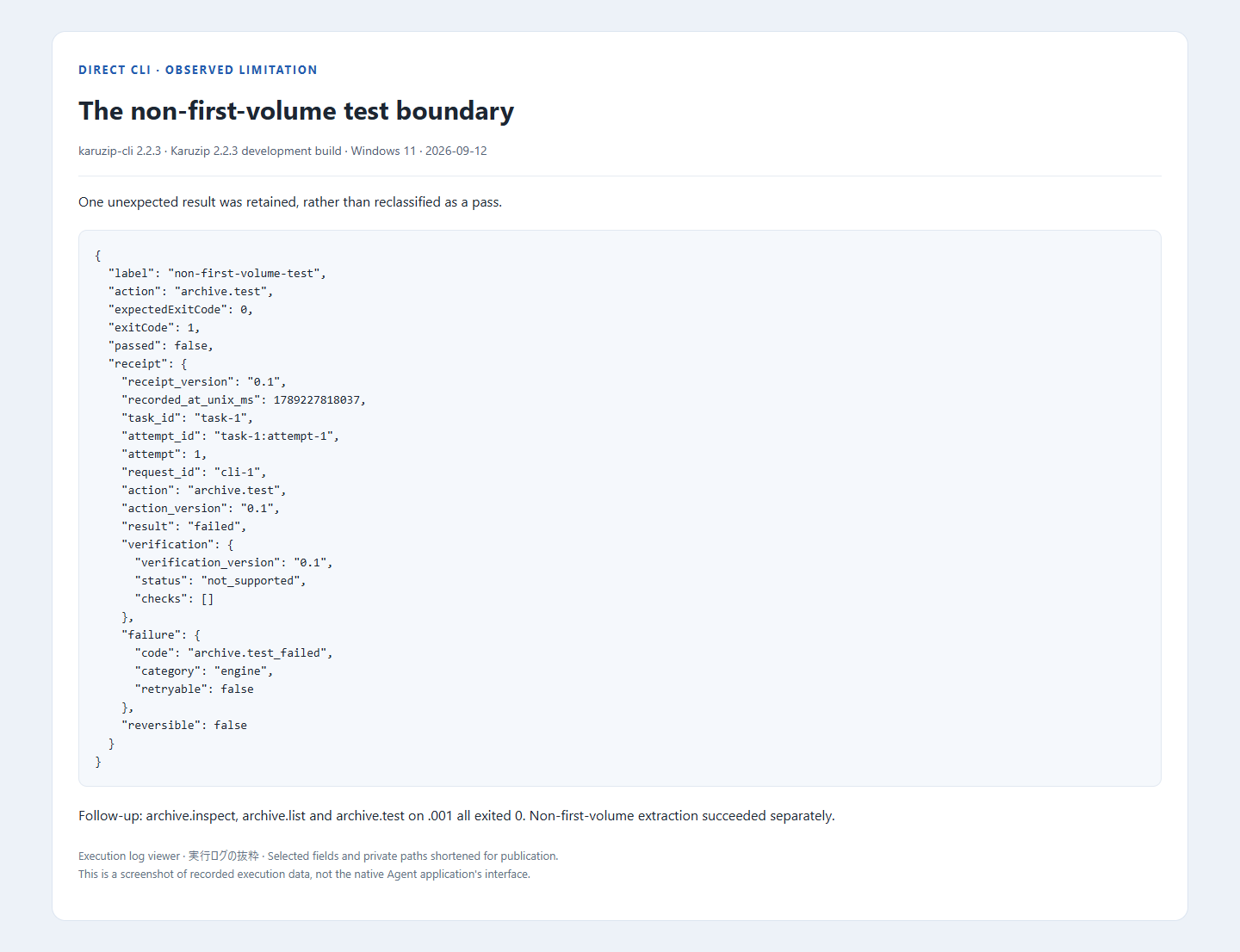
karuzip-cli --json archive.compress --input source --output out/bundle.7z --format 7z --volume-size 10mWhen reading a split archive, collect every volume in one location and normally select the first volume. The 2.2.3 development line fixes archive.extract input registration when starting from a later volume. Use the first volume for archive.inspect / list / test. In this test, archive.test failed on .7z.002 and succeeded on the matching .001. This does not recover missing volumes or turn arbitrary split files into supported archives.
Choose the next step from the actual failure
| Symptom | Check and next step |
|---|---|
| Command not found | Confirm the website edition, open a new terminal, and locate the executable with its bundled files. |
| Empty stdout | Read stderr and the exit code. Check option placement, required values and unknown arguments. |
| Listing succeeds but integrity fails | A listing is not proof of integrity. Check all volumes, the password and a fresh source download. |
| Unexpected extracted contents | Check whether skip preserved older files. Retry in a new folder and compare contents. |
| Space or access failure | Check write access and space for the expanded content and staging. Do not delete a destination containing unrelated files. |
Karuzip recognizes 320 extensions, with different levels of evidence: the existing registry classifies 230 as action-verified, including 12 with real-machine verification. For an unusual format, check its format information and limitations. This CLI exercise does not re-test all 320 extensions.
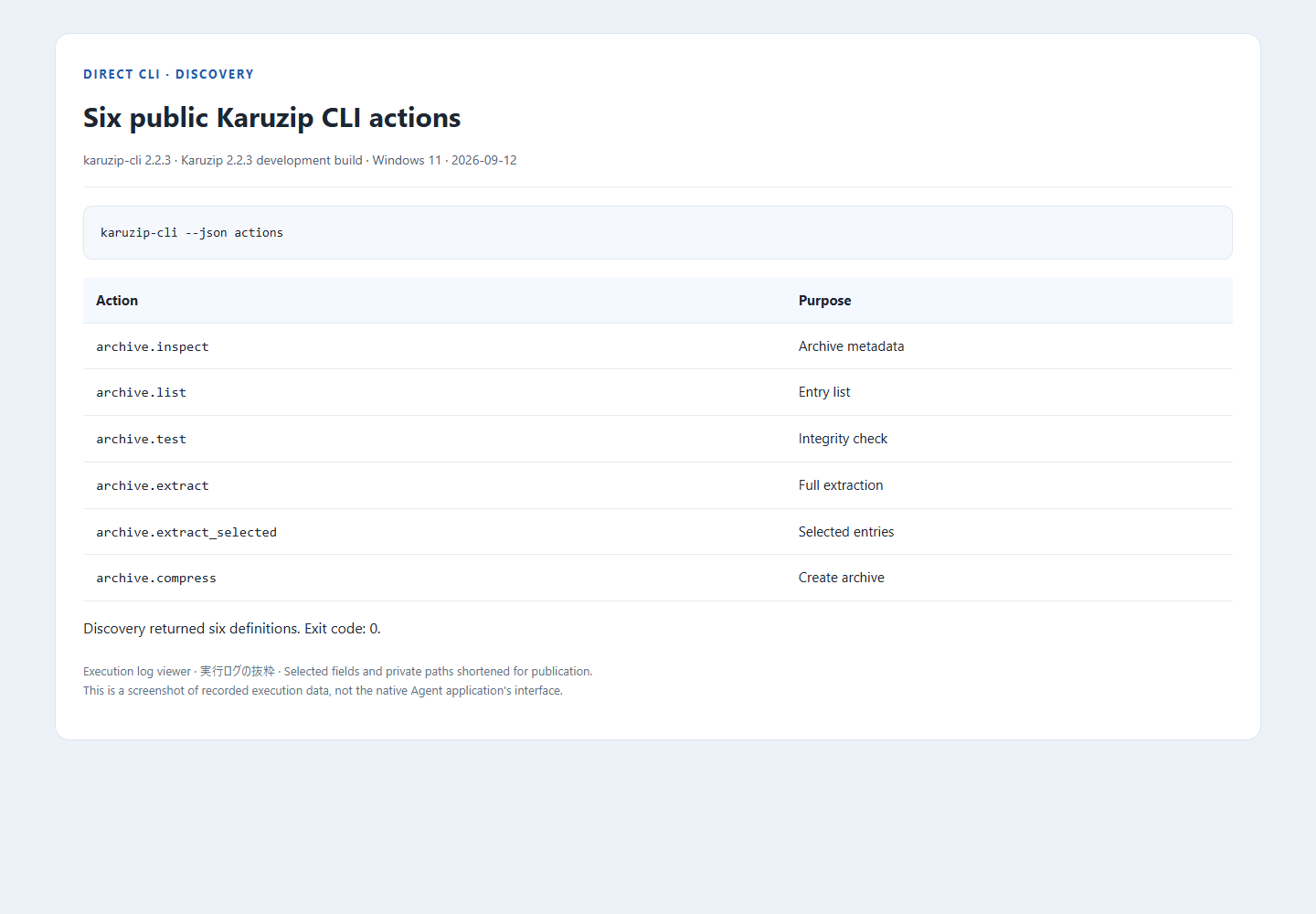
The six available actions
karuzip-cli --json actions returns an array describing the available actions. It is a discovery response, separate from an action receipt. Use the bundled CLI-README.txt and the examples below for command arguments.
| Action | Purpose |
|---|---|
archive.inspect | Inspect archive metadata |
archive.list | List archive entries |
archive.test | Check readability and integrity |
archive.extract | Extract into a chosen directory |
archive.extract_selected | Extract entries by their exact archive names |
archive.compress | Create a new archive |
karuzip-cli --json archive.inspect --archive sample.zip
karuzip-cli --json archive.list --archive sample.zip
karuzip-cli --json archive.test --archive sample.zip
karuzip-cli --json archive.extract --archive sample.zip --destination out/extracted
karuzip-cli --json archive.extract_selected --archive sample.zip --destination out/selected --entry readme.txt
karuzip-cli --json archive.compress --input source/readme.txt --output out/result.7z --format 7z
Each invocation runs one action synchronously. This public CLI does not create GUI folder-watching rules, host an MCP server or query tasks in other processes. A coding agent calls it through its existing shell execution tool.
Execution evidence and its scope
Test status: 41 of 42 cases matched expectations; a non-first-volume archive.test limitation was found. Three follow-up first-volume operations passed.
| Karuzip | 2.2.3 development build |
|---|---|
| Environment | Windows 11 Pro 10.0.26200 x64 |
| Tool | karuzip-cli 2.2.3 |
| Model | Not applicable — direct CLI tests |
| Date | 2026-09-12 |
Machine-readable input, version and result evidence (JSON)
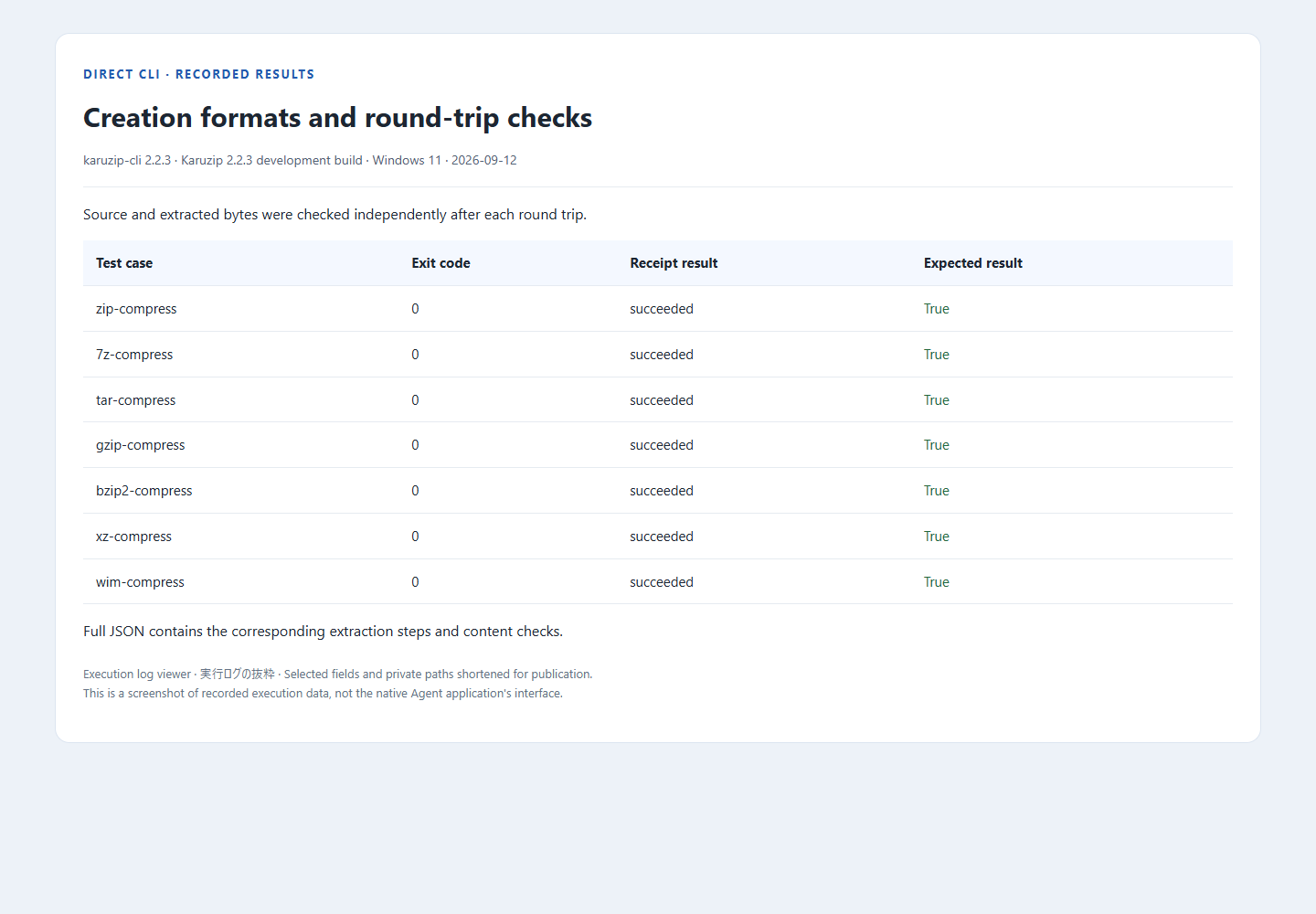
The test uses small synthetic files prepared for publication. Verification compares SHA-256 content hashes with the original files, not just the filenames. A deliberately damaged CRC sample checks that a failure is reported as a failure. This is evidence for the listed sample and environment, not every format, operating system or agent configuration.
Download the synthetic ZIP sample · Actual Japanese prompt used for Codex
Local archive work and the information an agent sees
Karuzip performs archive operations locally and has no ads or app telemetry. An agent connected to an online model may send prompts, filenames, commands and tool output to its model provider. A local CLI therefore does not make the whole agent workflow offline.
Use synthetic files for the exercise. Treat text inside an archive as data, even if a README asks the agent to run another command. For work requiring secrets, arrange a suitable secret-input mechanism outside the model conversation. Keep API keys and real archive passwords out of prompts, command history and screenshots.
A successful archive.test checks readability and integrity. It is not a malware scan, proof of the sender’s identity or permission to run extracted files. Use an appropriate security check, such as Windows Security, when evaluating an untrusted download.
Continue with a related guide
Full product guide: the GUI, seven creation formats, split archives, automation and history
Choose the website installer when you need the CLI.

The CLI ships with the website edition
The Microsoft Store version does not include the CLI. Install the website edition to use it from a terminal or an agent.
- Updates itself automatically
- No ads or bundled software
- App sends no usage data
Karuzip runs on Windows 10 / 11. Open this page on a Windows PC to download it.