Archive extractor for Windows 11
Quick answer: Choose Karuzip if you want a focused archive extractor for Windows 11 with preview, extraction, protection, tasks, and right-click actions in one app. If plain ZIP double-click extraction is all you ever do, the Windows 11 baseline can be enough.
Updated September 12, 2026 · Written by the Karuzip team
Use Karuzip when you want preview, extraction, protection, tasks, and right-click actions in one focused archive app. If you only need occasional plain ZIP extraction, Windows can handle some archive work on its own. Karuzip is useful when you want more control, more archive formats, and a workflow that stays centered on archive jobs.
When Karuzip is the better fit
| Situation | Why it fits |
|---|---|
| Preview first | Open the list before you extract. That helps you confirm the archive name, inspect the contents, and pick only the files you need. |
| Protect when needed | Create ZIP or 7z archives with passwords when you need to hand off files more securely than a plain archive can do. |
| Keep batch work organized | Queue multiple archives as separate jobs so retries stay local to the one item that failed. |
| Use right-click actions | Extract or compress from File Explorer without opening a separate tool first. The menu follows the selected Karuzip language. |
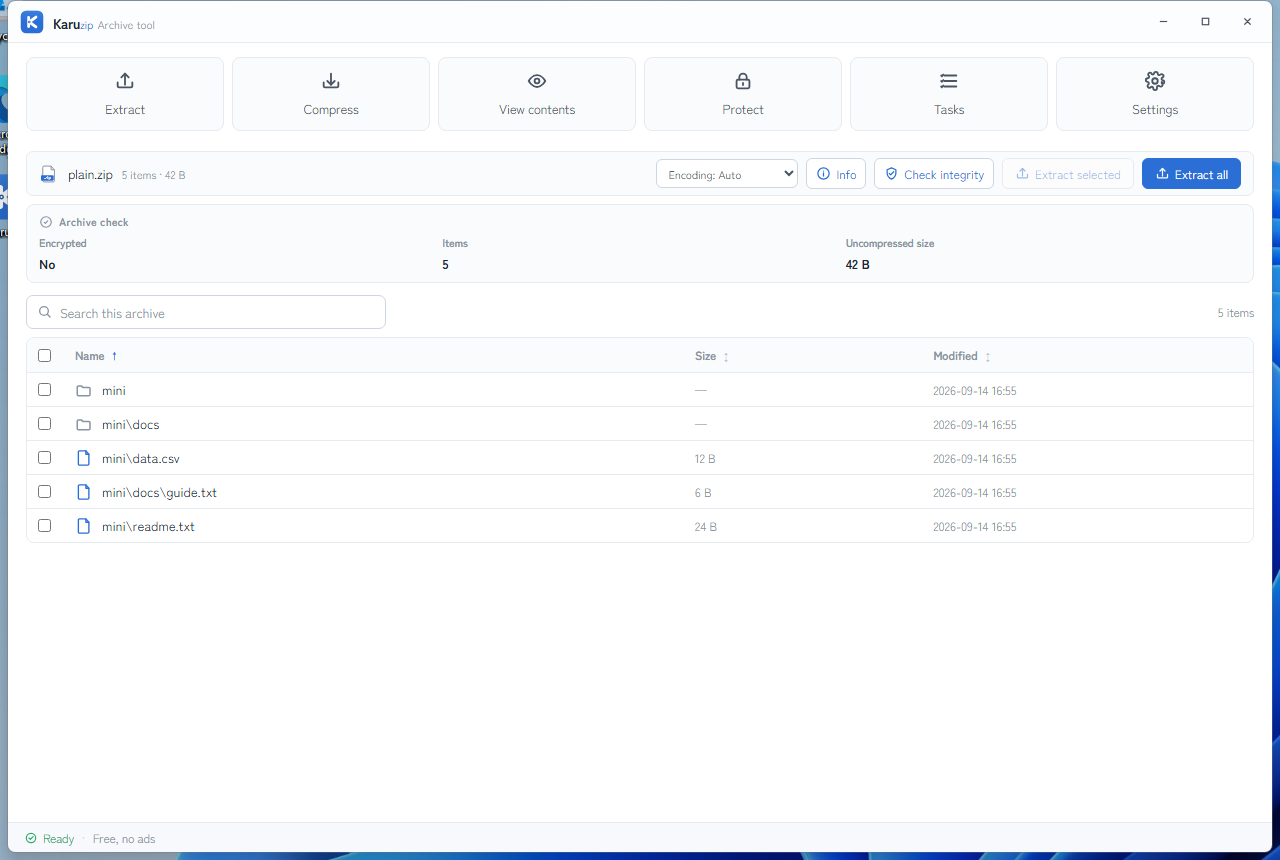
Windows Explorer is a baseline, not the whole workflow
| Capability | Windows 11 built-in | Karuzip |
|---|---|---|
| Plain ZIP extraction | Possible for simple cases | Yes, with more formats |
| Encrypted archive operations | Microsoft says Windows 11 version 24H2 does not support them | Create password-protected ZIP and 7z |
| Preview before extracting | Limited | File list with search and sorting |
| Batch task queue | Not available | Separate, retryable jobs |
| Ads, bundles, app telemetry | — | None |
Frequently asked questions
What makes Karuzip a focused archive extractor?
Karuzip is built around archive work: open, inspect, extract, protect, and queue jobs. That keeps the main archive tools together instead of splitting them across multiple places.
Is Karuzip only for Windows 11?
The Microsoft Store version is for Windows 11. The direct-download installer supports Windows 10 and Windows 11.
Can Karuzip open RAR files?
Yes. Karuzip can extract RAR archives, but it does not create RAR archives.
Does Karuzip track or bundle anything?
No. Karuzip has no ads, no bundles, and no app telemetry.
Can Karuzip create password-protected archives too?
Yes. Karuzip can create password-protected ZIP and 7z archives. It does not add password protection to every output format, and it does not create RAR archives.
Official references
- Microsoft Support: Zip and unzip files — the Windows 11 archive support baseline (accessed August 13, 2026).
- 7-Zip home page — supported formats and archive tools (accessed August 13, 2026).
- Karuzip English home — the product landing page and download entry point (accessed August 13, 2026).
Choose the archive extractor that stays focused on archives
Karuzip combines preview, extraction, protection, and queueing in one app. No ads, no bundles, and no app telemetry.

Choose between Windows, the GUI, and the CLI by task
For one ordinary, unencrypted ZIP, first check whether built-in Windows support is enough. If you need legacy filename encodings, encryption, split archives, selected extraction, or repeatable processing, choose a tool that supports that particular requirement.
Karuzip’s direct installer supports Windows 10/11 and includes the CLI. The Store edition targets Windows 11 and uses Store updates. If you installed only the Store edition, a missing karuzip-cli command is expected. An agent-based setup needs the correct distribution too.
The 2.2.3 development build revises completion feedback and archive navigation. The format boundaries remain: ZIP creation uses ZipCrypto, 7z uses AES-256, and RAR is extraction-only.
Start with the CLI reference, then follow the actual local-command workflow for Codex, Claude Code, or DeepSeek Harness.
Content checked against the 2.2.3 development source on September 12, 2026. Public download: 2.2.5. Historical screenshots and measurements retain their original version. Editorial and testing policy.