Quick Answer
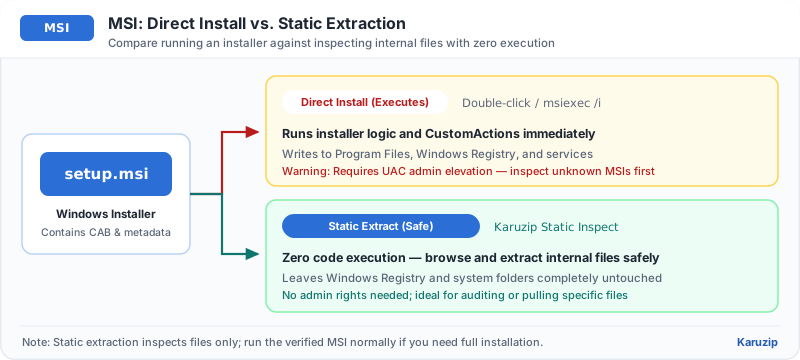
Open the .msi in Karuzip to inspect internal streams and embedded CABs without executing installer scripts, or use msiexec /a for clean administrative layout extraction. Extracting an MSI does not register services, DLLs, or shortcuts.
Windows 11 / 10 (64-bit) · Free · Zero ads
Choose the right workflow first
Check internal files without running installer
Open the .msi in Karuzip to browse streams without executing custom actions.
Extract clean installed folder tree
Run msiexec /a package.msi /qb TARGETDIR=C:\Out for a trusted MSI when you want real filenames and folder layout.
Actually install the program on Windows
Verify the publisher signature first, then run the MSI normally through Windows Installer.
Inspect an MSI file in 4 steps
Inspecting an MSI in Karuzip keeps your system registry and Program Files completely untouched.
- Check the digital signature firstRight-click the .msi, open Properties > Digital Signatures, and verify the publisher before trusting it.
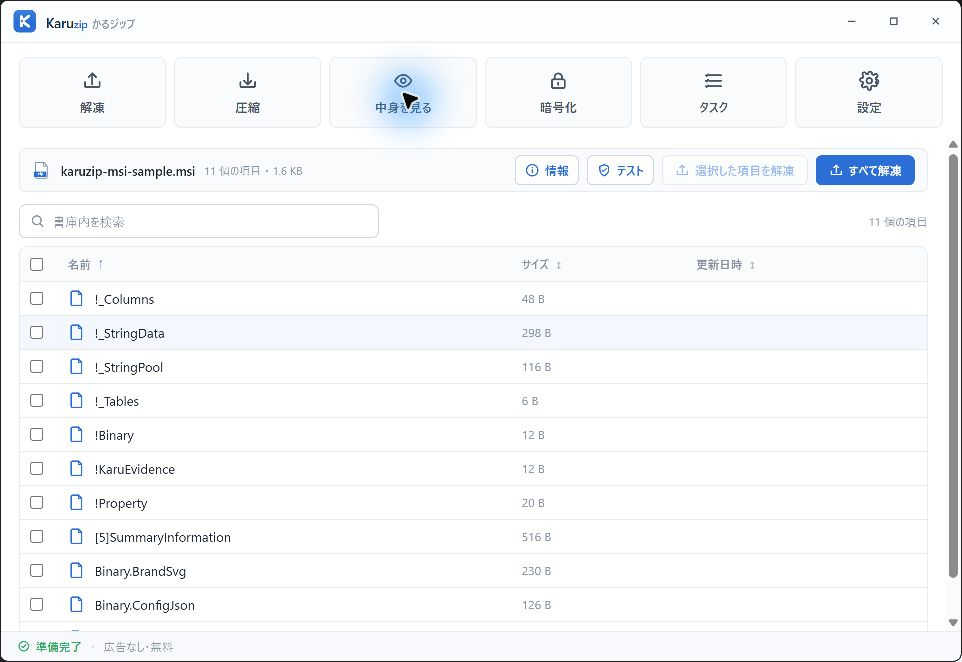
- Open the MSI in KaruzipDrag the .msi into Karuzip to inspect its internal database tables and embedded CAB streams without running anything.
- Extract needed streams to an empty folderExtract specific internal files or embedded CAB payloads into a temporary folder for inspection.
- Use msiexec /a if you need real target folder pathsFor trusted MSIs where Karuzip shows internal key names, an administrative unpack (msiexec /a) reconstructs normal folder names.
Karuzip vs. msiexec /a vs. normal MSI install
| Method | Executes installer? | Preserves final folder names | Installs app |
|---|---|---|---|
| Karuzip inspect/extract | No (read-only) | Shows internal MSI stream names | No |
| msiexec /a (admin extract) | Uses Windows Installer engine | Yes (TARGETDIR layout) | No |
| Double-click / msiexec /i | Yes (full install) | Yes (Program Files) | Yes |
Understanding MSI extraction limits
MSI files store metadata tables separately from compressed payload streams.
- Extracted filenames look like cryptic keys: MSI stores internal File table keys and packs binaries inside embedded CAB streams. Use msiexec /a on trusted MSIs if you need mapped filenames.
- Extracted app fails to launch: Many MSI-installed apps depend on registry keys, Visual C++ runtimes, or Windows services created during real installation.
- Security scan still required: Scan the .msi and any extracted executables with Windows Security before running them.
MSI inspection checklist
Frequently asked questions
Can I extract files from an MSI without installing the software?
- Answer
Yes. You can inspect internal streams read-only in Karuzip, or use Windows' msiexec /a command for an administrative unpack into a target folder.
Why do files extracted from an MSI have strange names?
- Answer
MSI packages store internal table identifiers and embedded CAB streams. Use msiexec /a on trusted MSIs to map them to their real destination filenames.
Can I run a program just by extracting its MSI?
- Answer
Usually no. Many programs require registry entries, shortcuts, services, or runtime dependencies that only a normal Windows Installer run configures.
Does opening an MSI in Karuzip run installer scripts?
- Answer
No. Karuzip reads the MSI container as an archive and never executes Windows Installer custom actions.
Verification & product scope
- Current release
- Karuzip v3.0.0 (14.71 MB installer, Windows 11 / 10 64-bit)
- Format coverage
- 320 extractable formats · 230 automated-verified · 12 real-machine verified
- RAR & password policy
- RAR is extract-only (no RAR creation). Karuzip never cracks, guesses, or recovers passwords.
- Checked date
- 2026-08-01
Archive integrity tests verify readability only and are not malware scans. Scan extracted executables or scripts with Windows Security before running them.
Official references

Inspect MSI packages read-only with Karuzip
Browse internal streams and embedded cabinets on Windows without triggering installation.
- v3.0.0 · updated 2026-11-16
- No ads or bundled software
- App sends no usage data
Karuzip runs on Windows 10 / 11. Open this page on a Windows PC to download it.