Quick Answer
Open a standard XAR-based .pkg file in Karuzip on Windows to inspect Distribution metadata, scripts, and inner Payload archives (often GZIP/CPIO) without executing anything. Mac apps inside cannot run on Windows.
Windows 11 / 10 (64-bit) · Free · Zero ads
Choose the right workflow first
Audit files or recover cross-platform assets
Open the .pkg in Karuzip on Windows to inspect XAR contents and unpack standard Payload streams.
Install the software on a Mac
Transfer the untouched .pkg to macOS and install via Apple's built-in Installer after verifying the signature.
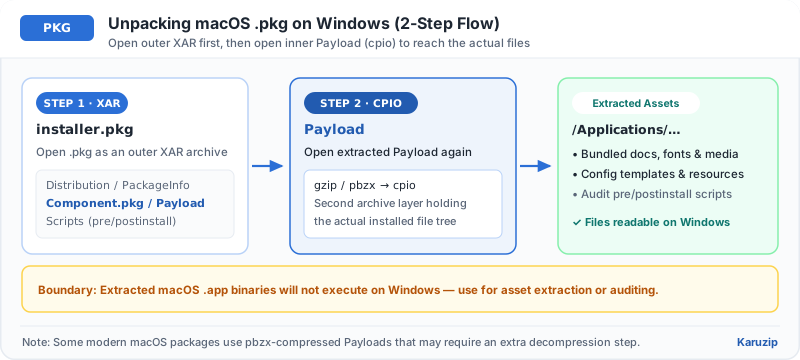
Inspect a PKG file on Windows in 4 steps
Many .pkg packages nest a Payload archive inside the outer XAR container.
- Confirm the PKG is a macOS XAR packageNote that .pkg is also used by PlayStation and other platforms; Karuzip targets standard XAR-based macOS .pkg archives.
- Open the PKG in KaruzipDrag the .pkg into Karuzip to view Distribution metadata, PackageInfo, and inner .pkg or Payload entries.
- Extract Payload if you need inner filesExtract the Payload file to a new folder, then open Payload in Karuzip (it is often GZIP-compressed CPIO) to browse the bundled files.
- Keep cross-platform assets onlyDocuments, fonts, or media work on Windows; macOS binaries (.app, .dylib) will not run on Windows.
macOS PKG behavior on Windows vs. macOS
| Action | Windows (Karuzip) | macOS (Installer) |
|---|---|---|
| Inspect XAR layout & Distribution XML | Supported | Via pkgutil / Suspicious Package |
| Extract cross-platform assets | Supported for standard XAR/GZIP Payloads | Supported |
| Install and run Mac software | Not supported | Supported |
Why some PKG files need extra steps
Not every .pkg file uses the same inner compression.
- pbzx-compressed Payload: Newer Apple system .pkg files may wrap Payload in Apple's pbzx stream rather than plain GZIP, which may require macOS tools to unpack.
- PlayStation or console .pkg files: Console game .pkg files are encrypted proprietary packages, not XAR archives.
- Mac apps cannot execute on Windows: Look for a Windows (.exe or .msi) download from the developer if you want to run the app on Windows.
PKG on Windows checklist
Frequently asked questions
Can I install a .pkg file on Windows 11?
- Answer
No. .pkg installers are built for macOS. You can inspect XAR-based .pkg contents on Windows with Karuzip, but you cannot install Mac apps on Windows.
Why do I see a Payload file inside a .pkg?
- Answer
macOS XAR packages store the actual file tree inside a nested Payload archive (often GZIP + CPIO). Extract Payload and open it in Karuzip to view its files.
Why won't my PlayStation .pkg open in Karuzip?
- Answer
Console .pkg files use proprietary encrypted formats rather than standard XAR archives.
Is opening a .pkg in Karuzip safe?
- Answer
Yes—Karuzip reads the archive offline and never runs macOS installer scripts. Still scan any extracted cross-platform files with Windows Security.
Verification & product scope
- Current release
- Karuzip v3.0.0 (14.71 MB installer, Windows 11 / 10 64-bit)
- Format coverage
- 320 extractable formats · 230 automated-verified · 12 real-machine verified
- RAR & password policy
- RAR is extract-only (no RAR creation). Karuzip never cracks, guesses, or recovers passwords.
- Checked date
- 2026-08-01
Archive integrity tests verify readability only and are not malware scans. Scan extracted executables or scripts with Windows Security before running them.
Official references

Inspect XAR-based PKG files offline with Karuzip
Browse macOS package metadata and extract cross-platform assets on Windows 11 and 10.
- v3.0.0 · updated 2026-11-16
- No ads or bundled software
- App sends no usage data
Karuzip runs on Windows 10 / 11. Open this page on a Windows PC to download it.