.WIM can be inspected and extracted in Karuzip. Karuzip supports both extracting and creating new .WIM archives. Verification tier: Verified on real hardware.
.WIM support summary
| Extension | .WIM |
|---|---|
| Kind | System container (Windows Imaging Format) |
| Extract | Supported |
| Create | Supported |
| Detection | Matched by extension and container header |
What a .WIM file is and when Karuzip is the right tool
Unlike sector-based images such as VHD or FFU, WIM stores files and metadata in a file-based container and can hold one or more indexed images in a single file.
When you only need to inspect the directory tree of a data WIM or pull out a few specific files without administrator-level DISM mounting, Karuzip opens the WIM read-only so you can preview, test, and selectively extract entries safely.
How to inspect and extract files from a .WIM in Karuzip
-
1
Keep a copy of the original .WIM file
Save the .WIM locally. Karuzip reads WIM containers without modifying them.
-
2
Open the .WIM file in Karuzip and check the list
Drag the .WIM file into Karuzip to view its internal folders and files. Run an archive test if you want to verify resource integrity before extracting.
-
3
Extract selected files to a separate folder
Select the files or folders you need and extract them to a working folder outside system directories.
Verified inspection and corruption detection on a data .WIM
In Karuzip's real-machine verification on Windows 11 25H2, a controlled single-index data WIM (9 folders, 7 files) listed cleanly, passed archive testing, and extracted selected files with matching SHA-256 hashes.
Negative tests with a 1-byte resource modification, truncated tail, or altered magic bytes were caught as corrupted or incomplete during archive testing.
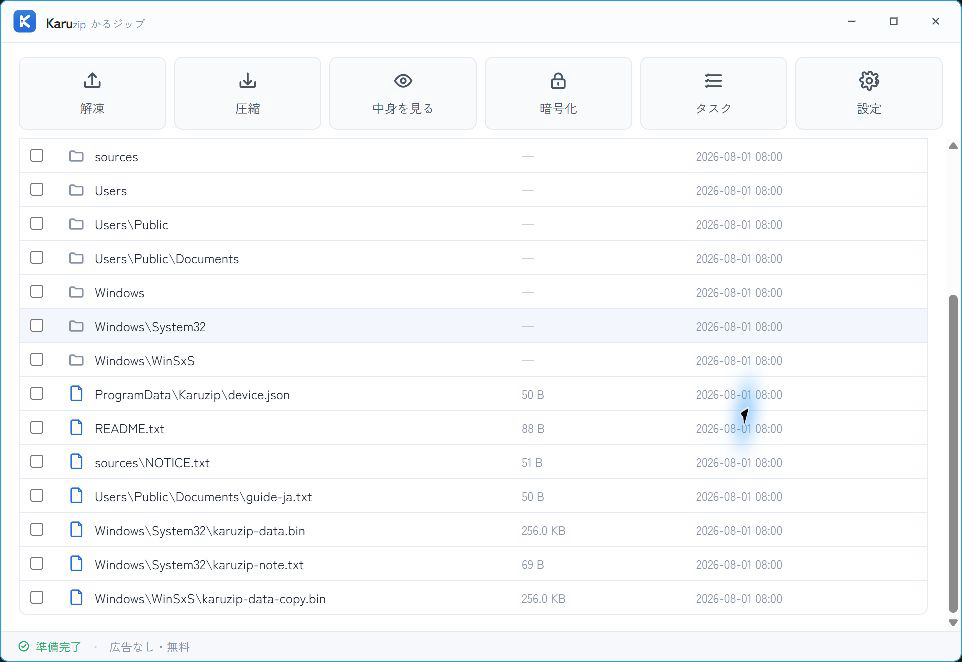
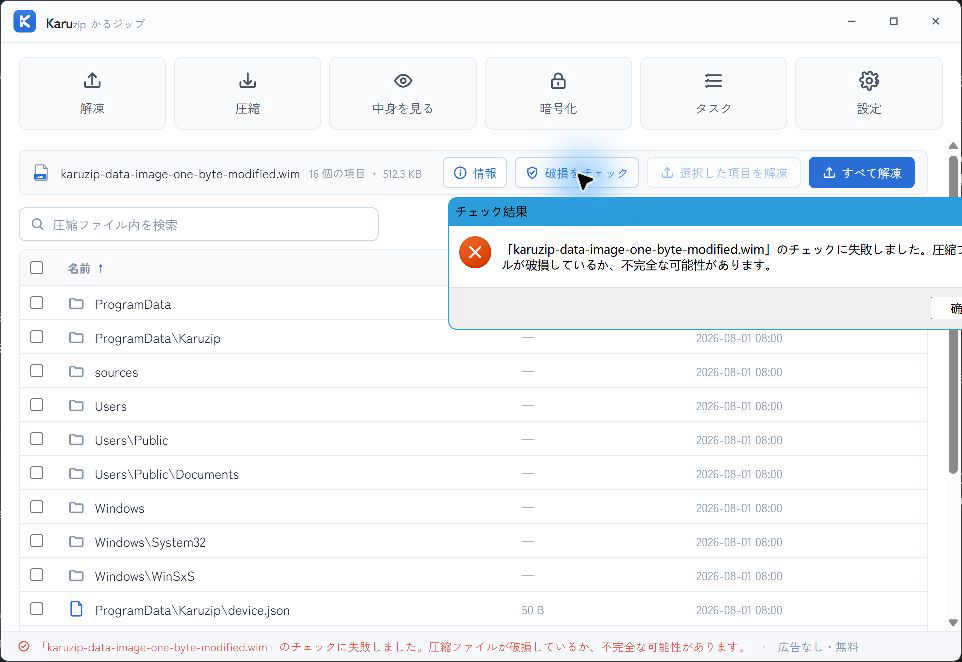
Verify .WIM inspection and extraction scope
Inspect and extract files from data WIM containers while keeping OS deployment tasks in DISM.
| Verified scope | Single-index data WIM: listing, archive test, full extract, selective extract with SHA-256 verification, and corruption detection. |
|---|---|
| CLI coverage | WIM is included in the published 2.2.3 development-build CLI check log. |
| Out of scope | DISM mount/apply/commit, multi-index Windows Setup servicing, SWM deployment, and ESD conversion. |
Use DISM (/Get-ImageInfo, /Mount-Image, /Apply-Image) whenever you are deploying or servicing a Windows installation image.
Inspect, test, and extract .WIM from the CLI
The CLI (karuzip-cli) is included with the official website edition (not the Microsoft Store edition).
karuzip-cli --json archive.inspect --archive ".\sample.wim"
karuzip-cli --json archive.list --archive ".\sample.wim" --max-entries 20
karuzip-cli --json archive.test --archive ".\sample.wim"
karuzip-cli --json archive.extract --archive ".\sample.wim" --destination ".\output-wim" --conflict-policy skip
Always review archive.test output before relying on extracted files from a WIM.
See Karuzip CLI actions and JSON output for full syntax and exit codes.
Recorded on the 2.2.3 development build with generated samples (including WIM CLI checks). CLI test inputs and execution record.
When to use DISM instead of Karuzip
Karuzip is for read-only inspection, integrity testing, and file extraction from WIM containers. It does not replace DISM for mounting Windows OS images, applying install.wim to a partition, servicing drivers, or committing changes back to a WIM.
Multi-index install.wim servicing, split .SWM deployment, .ESD conversion, and Windows Setup recovery should be performed with Microsoft's DISM tool.
.WIM frequently asked questions
Can Karuzip open a .WIM file without administrator privileges or DISM?
Yes. Karuzip reads WIM containers in user space to list contents, run integrity tests, and extract files without mounting the image.
Can Karuzip mount or service Windows install.wim images?
No. Karuzip extracts files read-only. For mounting, servicing drivers/updates, or applying an OS image to a drive, use Microsoft's DISM tool.
Can Karuzip detect a corrupted .WIM file?
Yes. Running an archive test checks the WIM resource streams and flags truncated or modified data as corrupted or incomplete.
Will opening a .WIM in Karuzip modify the original image?
No. Listing, testing, and extracting never modify the source .WIM file.
Related guides
Verification conditions
- Checked
- 2026-08-30
- Environment
- Windows 11 25H2 (build 26200.9168), Karuzip 1.4.5, bundled 7-Zip 25.01
- Samples
- Single-index non-boot data WIM (265,980 B, SHA-256 EACAB078EE561410C8F85C86AF2F97E12D85BA7C398B29783A698B0D53F6A4DD)
- Checks
- Listing 9 folders / 7 files, archive test, full extract, 3-file selective extract with SHA-256 match, plus truncated-tail, altered-magic, and 1-byte resource corruption negative tests
install.wim servicing, multi-index images, SWM, ESD, DISM mount/apply/commit, and Windows Setup are outside this verification scope.
Sources and verification policy
Format specifications and Karuzip's product verification scope are listed separately so you can tell container standards apart from tested behavior.
- Deployment and imaging overview | Microsoft LearnMicrosoft Learn official specificationFile-based WIM architecture vs. sector-based VHD/FFU.
- DISM Image Management Command-Line Options | Microsoft LearnMicrosoft Learn official specificationOfficial DISM commands for mounting, servicing, and applying WIM images.
- Karuzip format counts320 registered extraction extensions (230 automated sample-tested · 12 verified on real hardware)
- Verification tier on this pageVerified on real hardware. Pages are regenerated whenever format verification status changes.